StratoSort Core Architecture
High-Level Information Flow
This diagram illustrates the flow of data through the application, highlighting the separation between the Renderer (UI), the IPC Bridge, and the specialized in-process services.
graph LR
  classDef frontend fill:#e3f2fd,stroke:#1565c0,stroke-width:2px,color:#0d47a1
  classDef backend fill:#f1f8e9,stroke:#33691e,stroke-width:2px,color:#33691e
  classDef core fill:#eceff1,stroke:#455a64,stroke-width:2px,color:#455a64
  classDef ai fill:#f3e5f5,stroke:#7b1fa2,stroke-width:2px,color:#4a148c

  subgraph UI_Layer["Renderer Process"]
    direction TB
    AppEntry([App Entry])
    GraphView["Knowledge Graph"]
    ReduxStore[[Redux Store]]

    AppEntry --> ReduxStore
    AppEntry --> GraphView
  end

  subgraph Main_Process["Main Process"]
    direction LR

    subgraph Services["Core Services"]
      Watcher["Smart Folder Watcher"]
      ReRanker["Re-Ranking Service"]
      Matcher["Folder Matcher"]
    end

    subgraph Intelligence["AI & Analysis"]
      Vision["Llama Vision"]
      LLM["Llama Text"]
      Embeddings["Vector Embeddings"]

      Watcher --> Vision
      Watcher --> LLM
      ReRanker --> LLM
    end

    subgraph Data["Persistence"]
      Orama[(Orama Vector DB)]
      History["Analysis History"]

      Embeddings <--> Orama
      Vision --> History
    end
  end

  ReduxStore <--> Services
  GraphView -.-> Orama
  Matcher --> Embeddings
Key Architectural Components
1. Smart Folder Watcher
The watcher is the proactive heart of the system. Unlike a standard file watcher, it:
- Monitors configured paths for new/modified files.
- Debounces events to ensure files are fully written.
- Dispatches files to LlamaService (Text or Vision) for analysis.
- Automatically generates embeddings and updates Orama Vector DB.
- Triggers notifications and auto-organization based on confidence thresholds.
2. Semantic Search and Re-Ranking
Search is a two-stage pipeline that spans two services:
- Retrieval (
SearchService/OramaVectorService): Fetches top candidates using hybrid search (vector similarity + BM25 full-text). - Re-Ranking (
ReRankerService): Receives the pre-ranked candidates and uses a lightweight LLM to score each one’s relevance to the query (0-10 scale, normalized to 0-1), re-ordering them to bubble up the best matches.
ReRankerService itself does not perform retrieval – it operates solely on candidates passed to
it.
3. Unified Folder Matching
This service acts as the bridge between raw AI analysis and your filesystem. It:
- Manages the Orama connection.
- Generates embeddings for file content.
- Matches new files against existing folder “clusters” to suggest destinations.
- Handles deduplication of requests to prevent overloading the local AI.
4. Knowledge Graph Visualization
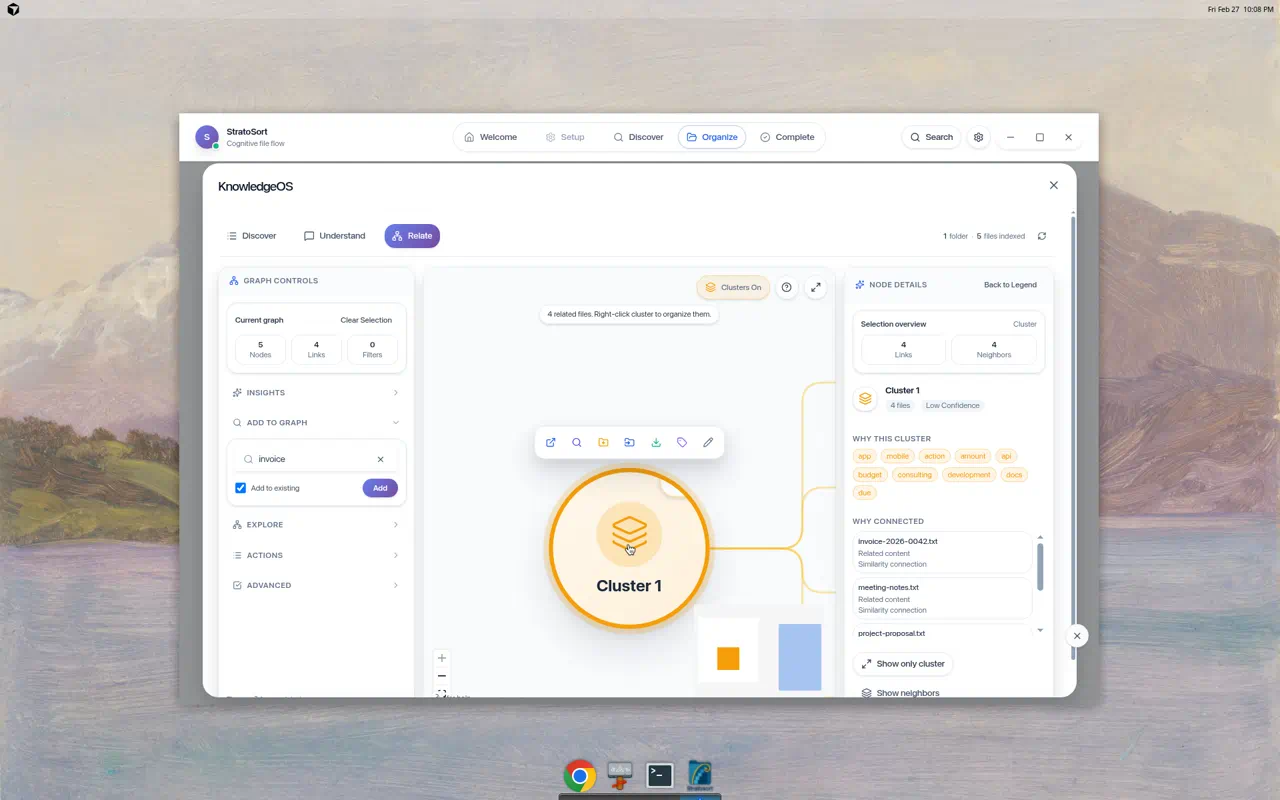
The Knowledge Graph is a visual representation of your vector database.
- Nodes: Represent files, clusters, or search queries.
- Edges: Represent semantic similarity (distance in vector space).
- Implementation: Built with
React Flowin the renderer, fetching live node data from the main process via IPC.
5. Service Container
The DI container that owns the lifecycle of every backend service:
- Registration: Factory-based with three lifetimes –
singleton,transient, andinstance(pre-created objects registered as singletons). - Resolution: Async resolution with in-flight deduplication (prevents duplicate initialization
of the same singleton). Circular dependency detection works for both synchronous
resolve()(via shared resolution stack) andresolveAsync()(viaAsyncLocalStorageper-chain tracking). - Shutdown ordering: Deterministic teardown defined in
SHUTDOWN_ORDER– watchers first, then AI services (VisionService, LlamaService, OramaVector), then settings last.
6. Startup Manager
Orchestrates the boot sequence with progress reporting to the splash screen:
- 5 phases: Migration (5-10%) -> Services (15-65%) -> Models (70-75%) -> App Services (85%) -> Ready (100%).
- Timeout: 60s default (
startupTimeout), enforced viaAbortController– every phase checkssignal.abortedbefore proceeding. - Health monitoring: After startup completes, a 2-minute interval polls service health.
7. IPC Handlers
19 handler modules organized by domain:
- Top-level (15):
analysis,analysisHistory,chat,files,knowledge,llama,organize,semantic,settings,smartFolders,suggestions,system,undoRedo,vectordb,window. - Files subdirectory (4):
fileOperationHandlers,fileSelectionHandlers,folderHandlers,shellHandlers. IpcServiceContext: Groups service dependencies into a single context object, replacing 28-parameter function signatures.ipcWrappers: Composable middleware (withErrorLogging,withValidation,withServiceCheck) and a unifiedcreateHandlerfactory.
8. AI and Analysis
LlamaService
In-process GGUF inference via node-llama-cpp. Three model types: text (Llama 3.2 3B default, or Qwen2.5-7B for better quality), vision (config/coordination only, delegates to VisionService), embedding (all-MiniLM-L6-v2 or nomic-embed 768d). GPU auto-detection (CUDA -> Vulkan -> Metal -> CPU), lazy loading via ModelMemoryManager (LRU eviction, 70% RAM budget).
VisionService
In-process multi-modal inference via node-llama-cpp and its companion projection files. No external background process required. 120s per-image timeout, health check polling.
Document Extractors
PDF (unpdf + OCR fallback), DOCX (mammoth), XLSX (xlsx-populate), PPTX (officeparser), CSV, plain text. OCR: Tesseract.js with Sharp rasterization, max 3 PDF pages / 10 office images. Memory limits: 100MB file cap, 500k char output, streaming for >50MB files.
Concurrency & Resilience
- ModelAccessCoordinator: per-type load queues (mutex), inference queue (1-4 concurrent, 100 max)
- LlamaResilience: per-model-type circuit breaker (5-failure threshold, 30s recovery), 3 retries with exponential backoff, GPU->CPU fallback
- ModelMemoryManager: LRU eviction, OOM prevention, estimates per model type
- DegradationManager: system readiness checks, determines recovery actions
Model Download (ModelDownloadManager.js)
Resume support (.partial + Range headers), SHA-256 verification, disk space checks. Auto-downloads
companion files (vision projectors), model catalog in src/shared/modelRegistry.js.
Embedding Pipeline
- ParallelEmbeddingService: semaphore-based concurrency (CPU-adaptive, max 10), dynamic adjustment on error rate
- embeddingQueue/: separate stage queues for files vs folders, batch upsert with individual fallback
Renderer / UI Layer
Entry & Routing
Entry: src/renderer/index.js (React 19 + createRoot, prefetches docs path / redact paths /
smart folders / settings).
Phase-based routing via PhaseRenderer.jsx (no React Router): WELCOME -> SETUP -> DISCOVER ->
ORGANIZE -> COMPLETE
Each phase lazy-loaded with React.lazy() + Suspense, wrapped in PhaseErrorBoundary.
Redux Store (4 slices)
| Slice | Responsibility |
|---|---|
uiSlice |
Phase management, loading flags, settings cache, modals |
filesSlice |
File selection, smart folders, organization history, naming |
analysisSlice |
Analysis progress, results (max 5000), embedding state |
systemSlice |
CPU/memory metrics, service health, notifications, paths |
Middleware: ipcMiddleware (event queue + Zod validation), persistenceMiddleware (1s
debounce, quota-aware degradation).
Knowledge Graph (UnifiedSearchModal.jsx, ~7400 lines)
React Flow with ELK layout, max 300 nodes.
- 4 node types: file, folder, query, cluster
- 4 edge types: similarity, queryMatch, smartStep, knowledge
- Features: Multi-hop discovery, drag-and-drop, keyboard nav, chat panel, cluster legend, guided tour
Graph UX Notes
- Bridge files: Cross-cluster edges include a small sample of “bridge files” picked by similarity to opposing cluster centroids. This is best-effort and not an exhaustive list.
- Guide intents: “Expand from selection” and “bridges-only” intents are supported; the bridges-only overlay dims non-bridge edges.
- Filter visibility: Active graph filters are surfaced as chips on the graph (top-left overlay) and can be reset from there.
Component Groups
| Directory | Contents |
|---|---|
discover/ |
Drag-drop zone, analysis progress |
organize/ |
Suggestions, virtualized grids |
search/ |
Graph, chat panel, autocomplete |
settings/ |
Model selection, embedding rebuild |
setup/ |
Smart folder management (add/edit modals) |
ui/ |
Design system (Button, Card, Modal, etc.) |
icons/ |
Icon components |
layout/ |
AppShell, ActionBar |
Root-level components include PhaseRenderer, NavigationBar, SettingsPanel, ModelSetupWizard,
Toast system, and error boundaries.
IPC Bridge (src/preload/preload.js)
Rate-limited (200 req/s), sanitized, channel-whitelisted, 30s-300s timeouts, retry with exponential backoff.
Data Flow & Caching
Analysis Caching
To respect local resources, we use a multi-tiered caching strategy:
AnalysisCacheService: Uses LRU caching for expensive AI responses (vision/text analysis).AnalysisHistory: Persisted log of all past analyses to prevent re-processing unchanged files.GlobalDeduplicator: Prevents identical requests (e.g., same image analyzed twice in quick succession) from hitting the LLM.
In-Flight Deduplication
We maintain separate queues to manage different types of bottlenecks:
- LLM Queue: Limits concurrent heavy AI tasks (via
ModelAccessCoordinator). - DB Queue: Manages read/write locks for Orama.
Code Standards
For information on coding patterns, error handling, and dependency injection, refer to the other documentation files: