Getting Started with StratoSort Core


This guide will walk you through setting up StratoSort Core on your local machine.
System Requirements
Before you begin, ensure your system meets the following requirements. StratoSort Core runs a fully local, in-process AI stack and does not rely on external servers.
System Dependencies Chart
| Component | Purpose | Requirement / Setup |
|---|---|---|
| Node.js | Core Application Runtime | v18+ (Included in installer; dev needs node installed) |
| GGUF Models | Local AI Inference | Auto-downloaded on first use (npm run setup:models) |
| Orama | Vector Search DB | Bundled in the app (no external install) |
| Tesseract | Image Text Recognition | Auto-installed (Win/Mac/Linux) with tesseract.js fallback |
| GPU | AI Acceleration | Optional but recommended (4GB+ VRAM) |
Installation
1. Clone the Repository
git clone https://github.com/iLevyTate/StratoSortCore.git
cd StratoSortCore
2. Install Dependencies
npm ci
Note: npm install/npm ci runs postinstall, which rebuilds native modules and runs setup scripts (best-effort). To skip, set SKIP_APP_DEPS=1 before installing.
3. Start the Application
npm run dev
Detailed Setup Instructions
On the first launch, the application will attempt to automatically set up all necessary AI dependencies (models + OCR).
Platform Notes
- Windows: Models download on first use. Tesseract auto-installs via
winget/chocolateyand falls back to bundledtesseract.js. Click “Install All (Background)” on first launch to download models. - macOS/Linux: Models download on first use. Tesseract auto-installs via brew/apt and falls back
to
tesseract.jsif native install is unavailable. - In-app setup: The Settings panel lets you configure models and verify OCR status.
Setup Workflow (No-CLI first run)
The following flowchart illustrates the automated setup process that runs on first launch:
graph TD
    Start([Start App / Setup]) --> CheckModels{Models Found?}
    CheckModels -- No --> DownloadModels[Download Models]
    CheckModels -- Yes --> CheckTess
    DownloadModels --> CheckTess

    %% Tesseract Flow
    CheckTess{Tesseract OCR?}
    CheckTess -- No --> AutoTess[Try Auto-Install<br/>(winget/brew/apt)]
    AutoTess -- Success --> Ready
    AutoTess -- Failed --> ManualTess[User Action Required:<br/>Manual Install]
    CheckTess -- Yes --> Ready([App Ready 🚀])
    ManualTess --> Ready

    classDef baseNode fill:#f9f9f9,stroke:#333,stroke-width:1px;
    classDef success fill:#e1f5fe,stroke:#01579b,stroke-width:2px;
    classDef warning fill:#fff3e0,stroke:#e65100,stroke-width:2px;

    class Ready success;
    class ManualTess warning;
Startup Preflight Checks
On each launch, StratoSort Core runs preflight checks to verify model availability, vector DB
readiness, and OCR health. If a service is slow to respond, you can raise the timeout using
SERVICE_CHECK_TIMEOUT (ms). Check logs if the app reports missing or unreachable dependencies.
Tesseract OCR Setup
StratoSort Core uses Tesseract OCR to read text from images. The setup script attempts to
install Tesseract automatically and falls back to the bundled tesseract.js implementation if
native install is unavailable:
- Windows: Uses
wingetorchocolatey - macOS: Uses
brew - Linux: Uses
apt-get
Language Data (tessdata)
Tesseract requires language data files to recognize text. The app configures this automatically:
- System-installed Tesseract: Uses the system tessdata directory (e.g.
/usr/share/tesseract-ocr/5/tessdata,/opt/homebrew/share/tessdata, orC:\Program Files\Tesseract-OCR\tessdata).
To use additional languages beyond English, install language packs for your Tesseract installation.
If automatic installation fails, please install Tesseract manually:
- Windows: Install Tesseract via UB-Mannheim or
run
winget install Tesseract-OCR.Tesseract - macOS:
brew install tesseract - Linux:
sudo apt-get install tesseract-ocr
After manual installation:
- Restart the application.
- If Tesseract is installed in a non-standard location, set
TESSERACT_PATHto the binary path. - If language data is in a non-standard location, set
TESSDATA_PREFIXto the tessdata directory.
Fallback Behavior
If native Tesseract is unavailable, the app falls back to tesseract.js. This fallback:
- Works without a system install
- Supports English only (
eng) - Can be slower on large images
Check logs for [OCR] messages to confirm which backend is active.
Adding Additional Languages
To use languages other than English:
- System Tesseract:
- Windows: Download
.traineddatafiles from https://github.com/tesseract-ocr/tessdata and place them inC:\Program Files\Tesseract-OCR\tessdata\. - macOS:
brew install tesseract-lang - Linux:
sudo apt-get install tesseract-ocr-[lang](e.g.,tesseract-ocr-fra)
- Windows: Download
- Verify: Run
tesseract --list-langsto see available languages.
Note: The app currently defaults to English (eng). Multi-language selection is planned.
One-click background setup
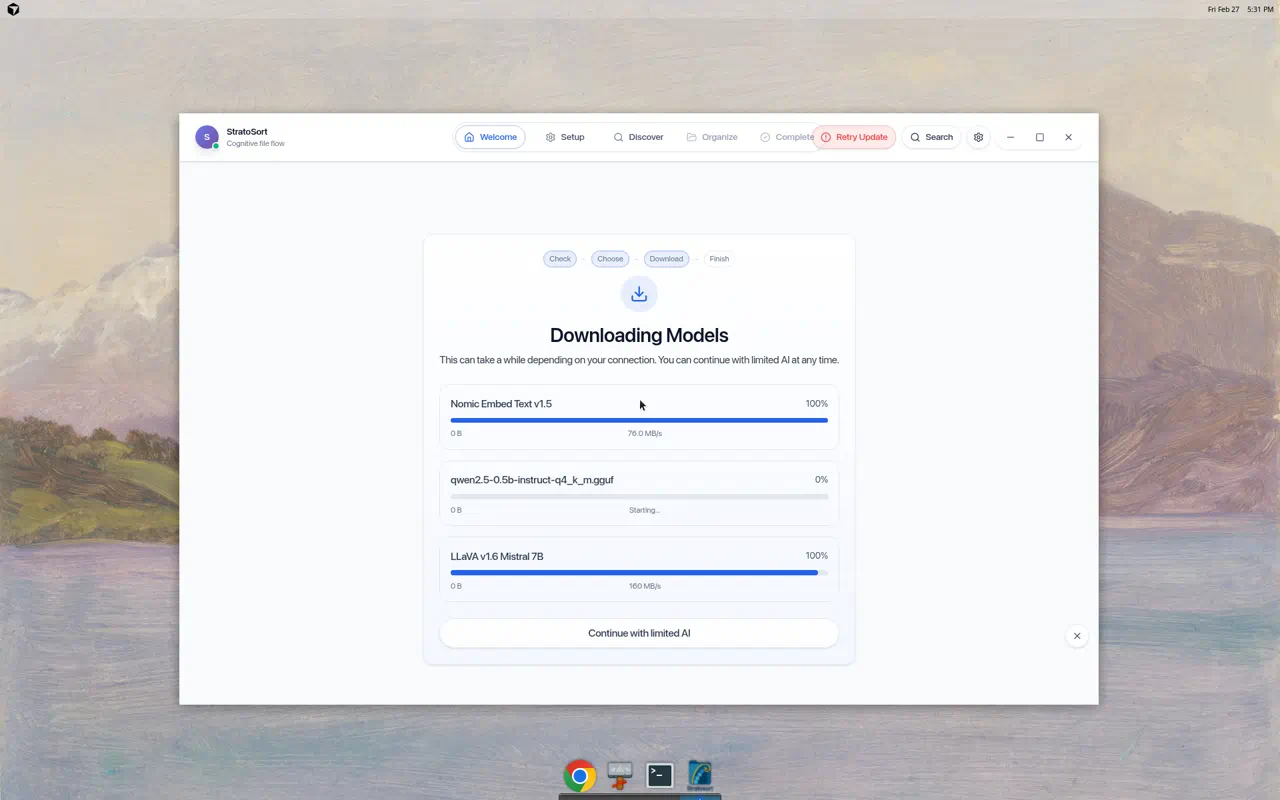
On first launch, open the AI Setup modal and click Install All (Background). This will:
- Download the recommended text/vision/embedding GGUF models
- Ensure OCR is available (bundled Tesseract or JS fallback)
The UI stays usable while installs/downloads run in the background.
Release Process (Developers)
For release steps (runtime staging, checksums, and notes), see the Release Guide.
Troubleshooting
If you encounter issues during setup:
- Check Logs:
- Windows:
%APPDATA%\StratoSort Core\logs\ - macOS:
~/Library/Application Support/StratoSort Core/logs/ - Linux:
~/.config/StratoSort Core/logs/
- Windows:
- Verify Models:
- Run
npm run setup:models:checkto verify models are available.
- Run
- Run Setup Script Manually:
- You can trigger dependency setup manually via:
npm run setup:deps
npm run setup:models
- You can trigger dependency setup manually via:
Next Steps
Once setup is complete, you’re ready to start organizing your files:
- Add Smart Folders - Configure folders with keywords and descriptions
- Enable Auto-Organization - Turn on folder watching in Settings
- Explore the Knowledge Graph - Visualize relationships between your files
For more information, see the main README or explore the documentation home.
Need help? Open an issue on GitHub. {: .text-center }